MS Access to Web Specialists

Modernize your Microsoft Access system with the right migration path

We help you choose the best-fit model: web app conversion, SQL backend migration, or hosted Access for faster stabilization and lower migration risk.

MSAccessOnline has delivered Access modernization projects since 2011—split-database repair, SQL upsizing, hosted RDS environments, and browser-based replacements for file-share setups.

No rebuild from scratchMulti-user readySecure cloud deployment

Choose your path

Three ways to take your Access database online

See what each option delivers at a glance, then open the service page for full scope and pricing.

Web conversion replaces Access with a browser app; SQL upsize keeps your forms while tables move to SQL Server; hosted desktop centralizes the same Access UI for remote teams while a longer roadmap is approved.

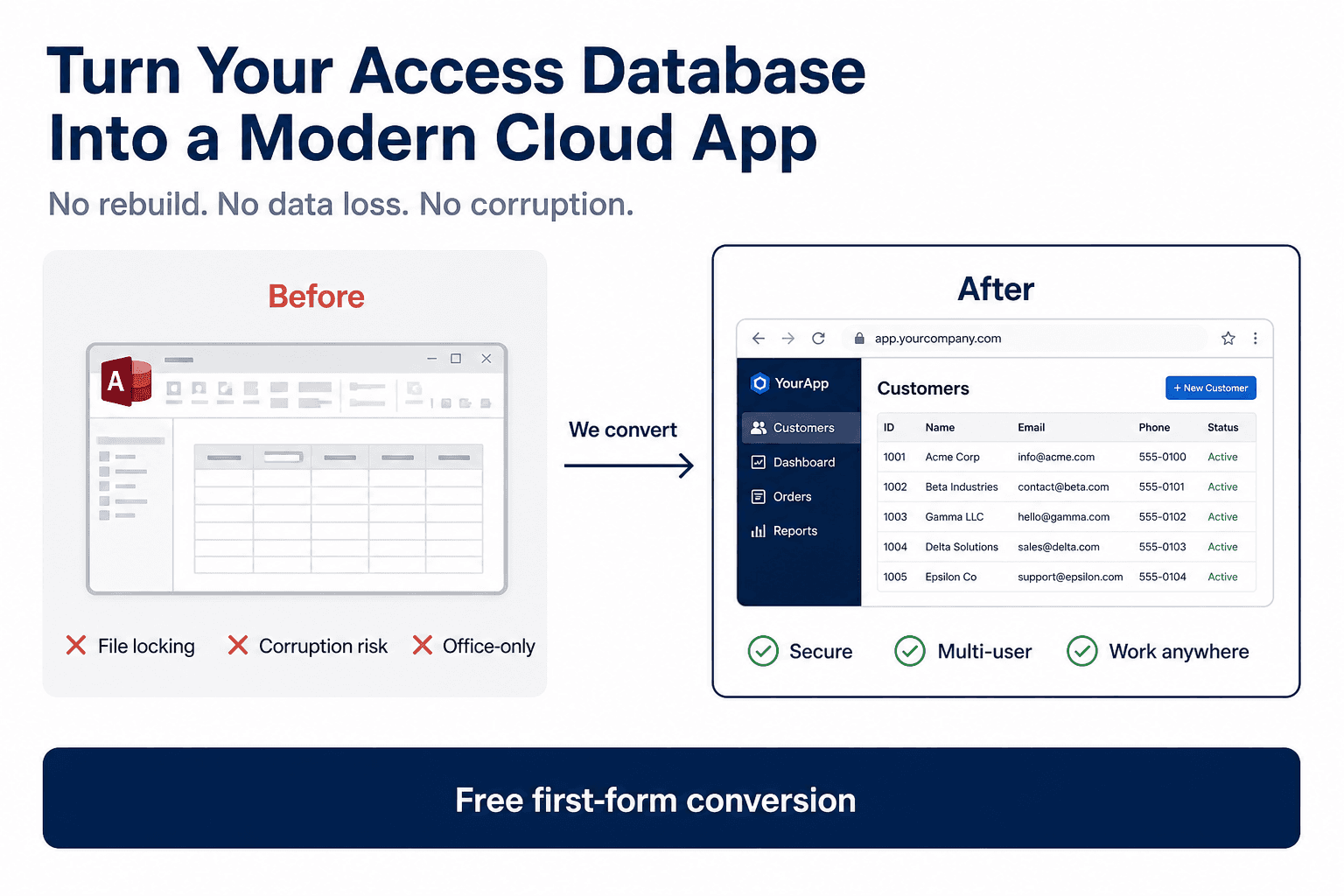
Diagram of MS Access to web app conversion: legacy Access forms and reports migrate to a secure browser application backed by SQL Server with multi-user cloud access
How MS Access modernization works: move forms, reports, and business logic from a shared .accdb file to a browser-based web application with centralized SQL data and role-based login.
Long-term

Web application conversion

Teams that want browser access without Access licenses.

Best long-term option for scale, security, remote access, and smooth integration with the software your organization already uses.

Day to day: Users work in Chrome, Edge, or Safari with secure login.

Approach: We rebuild your forms and workflows as a web interface while preserving your core business logic.

PricingCustom price at $50/hr

View full service
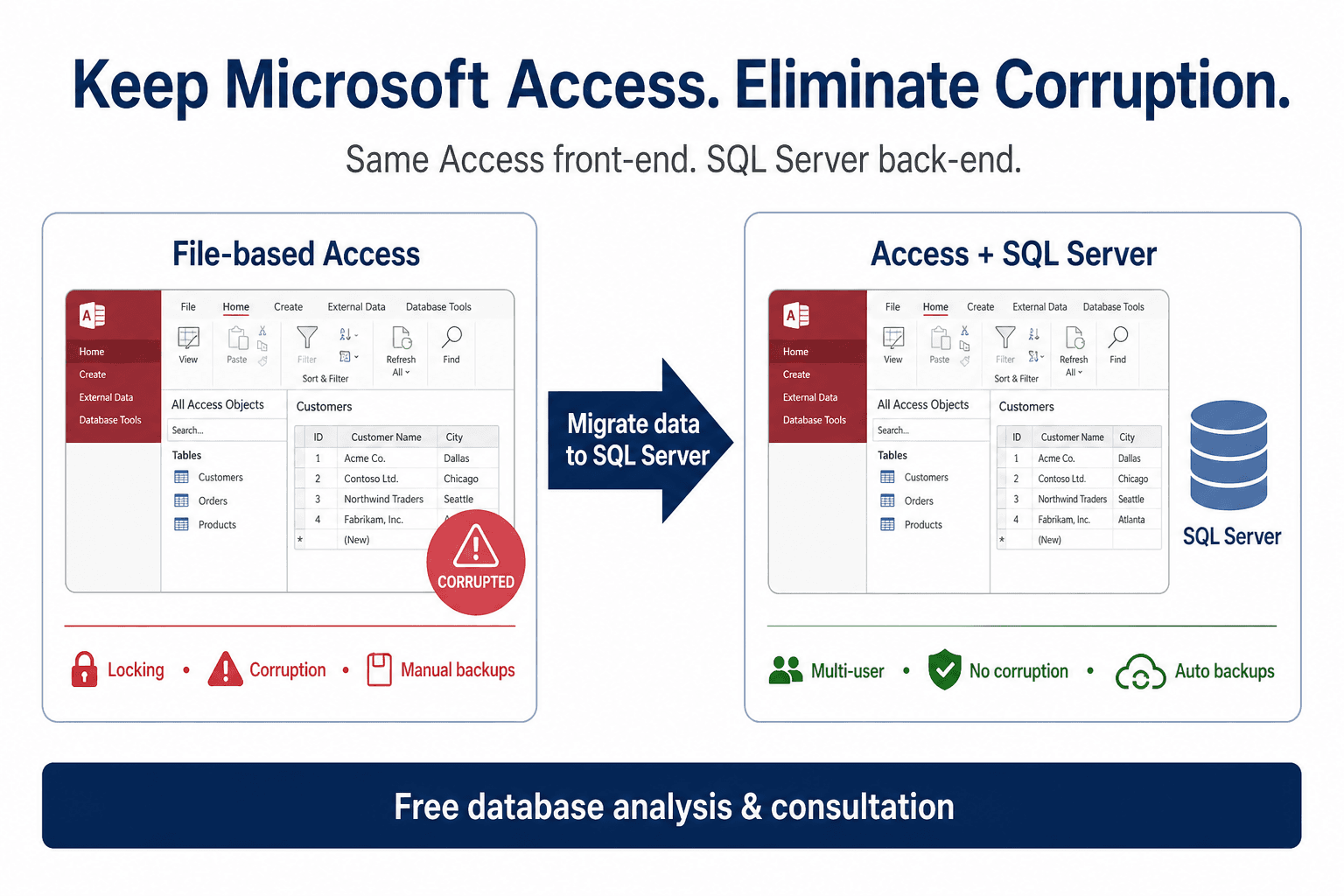
Access to SQL Server migration infographic: split Access front-end linked to SQL Server tables for stronger multi-user performance, backups, and data stability
Access to SQL Server upsize path: keep the Access UI your team knows while tables, queries, and backups run on a scalable SQL Server or Azure SQL backend.
Mid-term

SQL backend with Access front-end

Teams that want to keep Access UI but centralize data.

Great transition path when you need better stability now, before full web migration.

Day to day: Staff continues using Access while data is moved to SQL Server.

Approach: We migrate data from file-based storage to SQL Server and optimize tables/queries for multi-user usage.

PricingFixed cost for conversion + $50/month SQL hosting

View full service
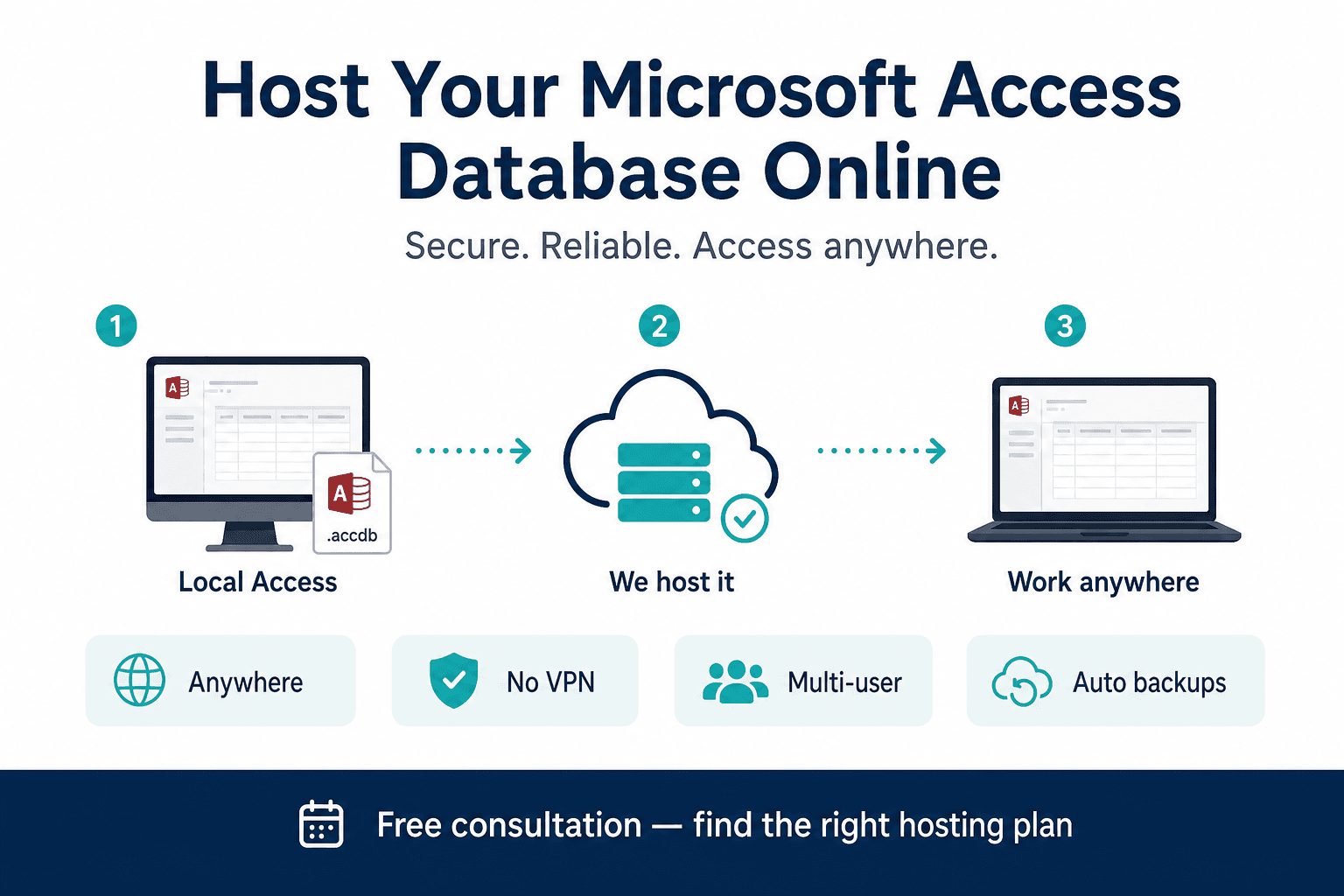
Remote Desktop Services diagram for hosting MS Access online: centralized cloud desktop runtime with secure multi-user remote sessions and no database rewrite
Hosted Access on cloud desktop (RDS): users open a secure remote session to run the same Access database centrally, ideal for short-term multi-user access without changing forms.
Short-term

Hosted Access on cloud desktop

Businesses that need Access as-is in the short term.

Fastest short-term deployment when you cannot change UI yet, but need centralized access.

Day to day: Users open a remote desktop session and run Access centrally.

Approach: We host your Access runtime in a managed cloud desktop environment with centralized control.

Pricing$30 per user/month

View full service

Trusted by teams we have supported

Real organizations using our Access-to-cloud solutions

Logos shown include manufacturing, distribution, professional services, and SaaS teams that moved off shared .accdb files, VPN-only Access, or aging split-database setups.

16+ client logosCloud migration specialists

Consultation

Talk directly with an Access migration specialist

Every consultation is handled by the delivery team that scopes and ships migration work. You get practical next steps, not a generic sales script.

Consultations are run by the same engineers who inventory .accdb objects, run pilot conversions, and plan Saturday SQL cutovers—so recommendations reflect real Access limits, not generic cloud slides.

01

What to share

Forms, reports, user count, pain points, and preferred hosting model.

A copy of the front-end .accdb—or a screen recording of the slowest workflow—is enough for a useful first review.

02

What you get back

A recommended migration path, phased scope, and realistic budget direction.

You receive a written recommendation covering web, SQL upsize, or hosted Access—whichever fits your file size, user count, and timeline.

03

Response SLA

We typically respond within 1 business day to all project inquiries.

Consultations are handled by the delivery team that scopes pilots and production cutovers, not a separate sales desk.

Why cloud

Why move from locally hosted MS Access to a cloud solution

If your current Access application runs on local files or a shared drive, you are likely facing lock conflicts, corruption risk, and limited remote accessibility. A cloud-based solution gives your business a more stable and scalable foundation.

Eliminate file conflicts and data corruption risk

Local file-based Access setups often break under multi-user load. Cloud architecture gives one centralized source of truth.

Enable secure access from anywhere

Your team can work from office, home, or on-site without VPN complexity or fragile remote desktop dependencies.

Improve performance as your business grows

Cloud-based databases and web apps handle more users and larger datasets better than shared local Access files.

Stronger security, backups, and continuity

Role-based access, centralized backups, and controlled deployment reduce operational risk and dependence on one machine.

Data hosting

For each option, you choose exactly where your data lives

The three options above are delivery models. Hosting is flexible in all three. Based on your IT and compliance needs, data can be hosted in our managed cloud, your cloud account, or your private network/on-prem infrastructure.

Security

Data Safety and Security

We understand that your Access database contains critical business information. Our cloud deployment model is designed to keep your data safe, recoverable, and protected at all times.

Daily backups

We maintain regular daily backups so your data can be restored quickly in case of accidental deletion, corruption, or unexpected failure.

Secure access control

User-level permissions help ensure only authorized people can view or edit sensitive records.

Safer than local file sharing

Cloud-hosted architecture removes dependency on local file copies, reducing common risks seen in shared Access file setups.

Deployments follow role-based permissions aligned to business roles, encrypted transport for browser and remote sessions, and backup retention agreed before go-live—whether data runs in our managed cloud, your Azure or AWS account, or a private network.

Pain points

If you are still using Access, you are probably dealing with:

These issues usually appear once more than a handful of users share one back-end .accdb, open the file over VPN, or copy local versions for remote work.

File sharing issues and “locked for editing” errors

Data corruption risks when multiple users access the file

No remote access unless using VPN or remote desktop

Slow performance as your data grows

Dependency on one developer or outdated setup

This slows down your business, creates daily friction, and increases operational risk.

Process

How a typical Access modernization project runs

Most engagements follow the same sequence: inventory the live .accdb, prove value with one workflow, then expand in fixed phases with validation between each cutover.

  1. Inventory forms, reports, and VBA

    We document tables, queries, macros, and integrations so scope is based on your actual .accdb, not assumptions.

  2. Free pilot on one real workflow

    One high-impact form is converted so your team validates speed, permissions, and daily use before a fixed quote.

  3. Phased module rollout

    Remaining forms, reports, and SQL moves ship in agreed phases with row-count validation between each stage.

  4. Cutover, backups, and hypercare

    Production switch includes rollback planning, backup checks, and support while users adjust to the new environment.

Conversion

We convert your existing Access database into a modern web application.

What changes for you

Conversion preserves validations, table relationships, and business rules from your current forms and VBA where they still apply—while replacing file-share concurrency limits with a centralized data layer.

Open your system in a browser with no installation

Enable multi-user work without record conflicts

Move to a centralized, controlled data model

Add role-based access and audit-friendly workflows

Improve speed, stability, and long-term scalability

You keep your logic. We upgrade the platform.

Outcomes

Business outcomes you will feel immediately

These outcomes reflect what operations and IT teams report after moving off shared .accdb files, slow VPN Access, or single-PC deployments.

Work from anywhere

Your system is available on desktop, laptop, or mobile with no VPN required.

Multi-user without breaking things

No more record locking or version conflicts.

Stronger data security

Centralized database with controlled access and backups.

Scales with your business

Add users, data, and features without performance issues.

Future-ready

Much easier to connect with your existing ERP, CRM, accounting tools, APIs, and internal systems.

Capabilities

What we can convert

Core Access workflows we modernize for cloud use:

  • Data entry forms
  • Reports and dashboards
  • Queries and filters
  • Relationships between tables
  • Business logic (with improvements)
  • VBA modules tied to form and report events
  • Split back-end tables with SQL linked-table setups

Why us

Why choose us

Why teams trust our migration process:

  • Specialized in Access to Web conversion
  • Fast turnaround: days, not months for initial results
  • No need to redesign everything
  • Built using modern, scalable tech
  • Phased pilot workflows before full production rollout
  • Direct work with senior Access developers since 2011

Pricing

Transparent pricing bands for Access to Web conversion

Add your form count and report count to estimate the right pricing band before detailed scoping.

Starter

1-5 combined forms + reports

$800 fixed

Growth

6-10 combined forms + reports

$1,500 fixed

Scale

11-20 combined forms + reports

Custom fixed quote

Enterprise

21+ combined forms + reports

SOW / hourly model

Use the pricing calculator to adjust for SQL migration or hosted Access per user, then book a consultation to confirm scope against your actual form and report count.

Open pricing calculator

Reviews

Professional reviews

Teams choose us for practical migration paths, clear scope, and outcomes that remove day to day operational risk.

We were constantly hitting lock conflicts in Access. The converted web workflow removed that friction in week one.

Operations Manager, Manufacturing Team

The phased approach helped us avoid a risky rebuild. We modernized critical forms first and kept business moving.

Director of Business Systems, Logistics Company

Clear scope, fast turnaround, and a much more stable multi-user environment than our old file-share setup.

Founder, Services Firm

Rajan gave us a phased plan our team could execute without stopping production. Lock conflicts dropped within the first month after pilot go-live.

Sarah Mitchell, Operations Director · Regional Manufacturing Co.

Access to web conversion · 12-user system

Clear scope, realistic timelines, and honest trade-offs. We moved critical workflows first and avoided a risky full rewrite.

David Chen, IT Manager · Logistics & Distribution Firm

Phased SQL + web migration · 28 users

The consultation alone saved us weeks of internal debate. We knew exactly what to migrate now, what to defer, and what budget to expect.

Emily Rodriguez, Founder · Professional Services Company

Free pilot + fixed-price phase 1

Resources

MS Access migration guides and pillar services

Start with the service path that matches your goal, then read the detailed guides our team publishes for IT leaders and operations teams.

Case studies

Case studies: real Access migration scenarios

Representative projects across web conversion, SQL upsize, and hosted Access. Details are anonymized; patterns match what we deliver each month.

Next steps

Pricing and next steps

Every database is different.

Typical projects range from small internal tools to full business systems. After the free form conversion, we provide a clear fixed-price or phased plan.

Fixed bands start at $800 for 1–5 combined forms and reports; SQL hosting and hosted Access per-user pricing are confirmed after a quick inventory of your .accdb.

FAQ

Frequently asked questions

Can we keep part of our current Access setup?

Yes. We can deliver a phased model where critical workflows move to web first while other modules stay in Access.

How do you estimate pricing?

We map forms, reports, and workflow complexity, then share a fixed tier or phased quote with clearly defined scope.

Do you support private-network deployments?

Yes. We support public cloud and private-network deployment options based on your security requirements.

How long does an Access to cloud migration usually take?

Timelines depend on form/report count and workflow complexity. Most clients start with a fast pilot conversion, then move to phased rollout.

Will we lose data during migration?

No. We follow controlled migration steps with validation and backups to ensure data integrity before production go-live.

Can we start with one module before full migration?

Yes. We recommend starting with one high-impact workflow so your team can validate results with low risk.

Do users need Microsoft Access installed after migration?

For full web conversion, no. Users access the system through a browser. If you choose SQL backend with Access front-end, Access may still be used.

How is user access and security managed?

We implement role-based permissions, controlled authentication flows, and backup-ready deployment standards aligned to your business policies.

Do you provide support after launch?

Yes. We provide post-launch support for stabilization, enhancements, and phased expansion based on your operational priorities.

Can you integrate with APIs, ERP, or accounting tools?

Yes. We can integrate your cloud solution with third-party APIs and business systems based on your process requirements.

What if our current Access app has complex VBA logic?

We review existing VBA workflows and map them to modern web-compatible logic. Critical business rules are preserved and improved where needed.

Can we host the system on our own server?

Yes. We support both managed cloud hosting and private-network or client-managed deployment models.